Merkury Smart
- 4.1
- Rating
- 500.00K
- Installs
- Free
- Price

 Analysis by App-foxy
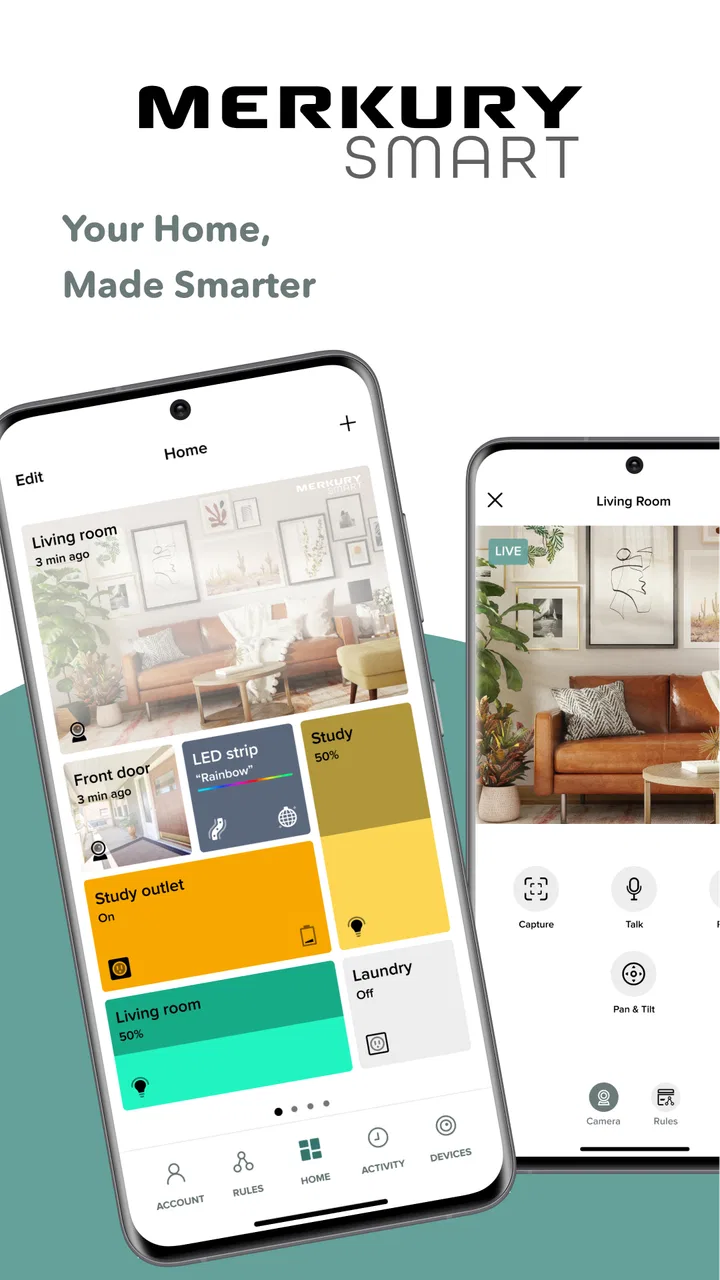
Smart-home control sounds simple until a device refuses to respond at the exact moment you need it. I spent time with Merkury Smart to see how well it handles that everyday gap between tapping a phone and getting a real reaction from a connected device. Developed by Merkury Innovations, this free House & Home app is designed around one clear purpose: bringing compatible smart devices into one mobile control point.
My overall impression is that it is most useful when I treat it as a practical remote rather than as a complete replacement for every smart-home platform. It can make routine actions easier, especially when I want to check or adjust a device from another room. At the same time, the experience depends heavily on the quality of the connection between the phone, the app, the home network, and the device itself. The app is only as convenient as the communication chain behind each command.
What the app feels like in daily use
The first thing I noticed is how focused the concept is. Merkury Smart is not trying to be a general lifestyle app, a shopping tool, or a social dashboard. It belongs firmly in the smart-home category, and its value comes from reducing the need to operate compatible devices one by one. For someone building a home around Merkury products, that single control point can feel much tidier than keeping several unrelated device apps open.
You May Also Like

 Blood Strike: 2.5 Anniversary
Blood Strike’s Loadouts Turn Every Drop Into a Tactical Gamble
A close look at Blood Strike’s custom loadouts: how fast access to signature weapons reshapes its battle royale rhythm, rewards preparation, and narrows the gap between fights.

 Pandora - Music & Podcasts
Pandora’s Music Is Easy to Start, but Harder to Recover
Pandora’s strength is its low-effort path from a seed to a station. Its weak spot is how much confidence it asks you to place in connection, setup, and quiet recovery.

 8 Ball Pool
 Is Built on Rivalries, Rematches, and Routine
A close look at the rivalries, rematches, shared routines, and unanswered safety questions that turn a quick pool match into a persistent mobile community.

 Samsung Music
’s Quiet Strength Is Playing What You Already Own
Its reach comes less from spectacle than from dependable access to a personal library. That simplicity is both the app’s strongest retention engine and its ceiling.

 AccuWeather: Weather Radar
AccuWeather Review: A Quick, Clear Forecast for Everyday Decisions
For everyday plans, the best forecast is the one you can understand quickly. AccuWeather makes rain timing, radar, and local conditions easy to act on, with a few trade-offs.

 Hill Climb Racing
Why Hill Climb Racing Still Turns Crashes Into One More Run
A tiny car, a bumpy hill and one more upgrade: Hill Climb Racing keeps resurfacing because its simple chaos makes every near-miss feel personal.
More From Our News Desk



The app is free, carries an Everyone age rating, and runs on Android devices using version 7.0 or later. Its current version is 3.12.0, which makes it accessible to people using older supported Android hardware as well as newer phones. I would still pay attention to the phone itself: an older device may run the app, but a weak battery, crowded storage, or unreliable wireless connection can make a smart-home experience feel worse than the application actually is.
Its public reception is encouraging, with a 4.5 average from around 17 thousand ratings and roughly 1.9 thousand written reviews. More than 500 thousand installations suggest that it has found a real audience rather than remaining a niche experiment. Those figures do not guarantee that every device or household will behave perfectly, but they do give me confidence that the app is established enough to be worth trying when its compatible hardware matches your needs.
Why connectivity matters more than the interface
With a smart-home app, the visible screen is only one part of the experience. A command may travel from the phone to the home network, then to the relevant device, before the physical action happens. If any link is slow or unavailable, the app can appear unresponsive even when the problem is outside the screen.
This is particularly noticeable when I am moving between rooms. A phone may show a normal connection while the smart device is positioned in a place where wireless coverage is weaker. In that situation, repeatedly tapping the same control is rarely the best answer. I prefer to pause, check whether the device is actually reachable, and then try again once rather than creating a string of duplicate commands.
That habit is more important with actions that have a visible or physical result. If I am changing a light, I can usually tell quickly whether the command worked. If I am adjusting a device in another room, I may not notice a delayed response and could assume nothing happened. A short wait followed by a visual check is safer than treating every tap as an immediate confirmation.
A realistic evening scenario
Imagine arriving home with shopping bags while your phone is in one hand and keys are in the other. Opening the app to control a compatible device can be more convenient than finding a physical switch or walking through the house. The benefit is not dramatic every time, but it becomes meaningful when the device is hard to reach, located in a darker room, or part of a routine you repeat daily.
The same scenario also exposes the weakness. If the phone has just moved from mobile data to the home network, or if the network is busy, the command may take longer than expected. I would not rely on the app as the only way to perform something essential. A physical control or another dependable fallback remains sensible for devices that need to be operated immediately.
Using it away from home and on the move
Mobile use changes the expectations. At home, I can troubleshoot the phone and the device in the same place. Away from home, I may be trying to check or control something without being able to see it directly. That makes clear feedback and patience more important than speed alone.
I found it useful to separate two questions: “Did I send the command?” and “Did the device complete the command?” A screen action may only answer the first question. When I am away, I avoid making several changes in quick succession unless I have a reliable way to confirm the result. This is a small workflow adjustment, but it prevents confusion when a delayed connection catches up later.
For people who travel often, the app can be appealing as a convenient remote for compatible home devices. However, I would not choose it solely on the assumption that remote control will always be instantaneous. Connectivity can vary with the phone’s current network, the home connection, and the device’s own availability. The farther I am from the home, the less useful guesswork becomes.
There is also a practical phone consideration. A smart-home app is most helpful when it is easy to reach, so placing it where I can find it quickly is worthwhile. I would also avoid testing an important command for the first time while away from home. Setting up and confirming normal operation locally gives me a better understanding of what a successful response looks like before I depend on it from elsewhere.
When a command fails
Connectivity failures are not always obvious. A device may be powered off, the phone may be on a different network, or the connection may simply be slow. Instead of assuming that the app itself is broken, I work through the problem in a fixed order: check the device’s power, check the phone’s current connection, reopen the app if the screen appears stale, and then try one command again.
This approach matters because repeated tapping can make troubleshooting harder. If the first instruction is delayed rather than lost, several additional taps may produce an unexpected sequence once the connection recovers. For a light or another simple control, that may only be annoying. For a device where the state matters, it can leave me unsure which action actually took effect.
A useful recovery habit is to change only one variable at a time. If I restart the app, switch networks, and power-cycle the device simultaneously, I may get a result without learning what caused the issue. When I test one step and wait for a response, I can build a clearer picture of whether the problem is the phone, the network, or the hardware.
I also recommend keeping a manual alternative available. That is not a criticism unique to Merkury Smart; it is a sensible rule for connected-home equipment generally. The app adds convenience, but convenience should not become the only route to a necessary action. This is especially relevant for households with several people, guests, or anyone who is not comfortable diagnosing a connection problem.
Where it fits beside usual alternatives
The usual alternative is often the manufacturer’s separate control method for each device. That approach may be acceptable when a home contains only one connected product, but it becomes tiresome as the collection grows. Merkury Smart’s strongest argument is the possibility of keeping compatible control in one familiar place instead of jumping between separate applications.
Another alternative is a broader smart-home ecosystem chosen for voice control, automation, or cross-brand compatibility. That may be a better direction for someone who already owns devices from many manufacturers and wants one central system. Merkury Smart makes more sense when the household is already centered on compatible Merkury equipment and the priority is straightforward mobile access rather than building a large mixed-brand setup.
I would also distinguish between a control app and a full home-automation strategy. A central app can make individual actions easier, but it does not automatically solve every issue involving network coverage, device placement, household permissions, or backup operation. If your main goal is elaborate routines across unrelated brands, compare the wider ecosystem before committing to a device collection around this app.
Being careful with connected-home data
Any app that links a phone to equipment in the home deserves a little attention from the user. I keep my account details private, avoid signing in on a shared phone, and review the app’s behavior after updates rather than assuming that every setting remains exactly where I remember it. These are ordinary precautions, but they are easy to neglect when an app feels as simple as a remote control.
I also try to limit unnecessary access on the phone and keep the application updated through the normal store process. The point is not to become suspicious of every connection; it is to make the smart-home setup deliberate. A device that can be controlled from a phone should be treated as part of the household’s digital environment, not just as another icon.
For shared homes, it helps to agree on basic habits. Everyone should know whether a command has been completed before sending another one, and people should understand what to do if the network is unavailable. This prevents a common source of confusion: one person troubleshooting while another person is still issuing commands from a different phone.
Who will get the most from it
I think Merkury Smart is a good fit for someone who owns compatible Merkury devices and wants a direct way to manage them from an Android phone. It is also appealing to people who prefer a focused interface over a large platform filled with features they may never use. The free cost lowers the barrier to trying it, provided the hardware and phone environment are suitable.
It can be especially useful for small routines: adjusting a device without crossing the room, checking a connected item before settling down, or managing a household where several compatible products would otherwise require separate controls. The benefit grows through repetition. One tap saved once is minor; the same convenience used every day becomes a genuine quality-of-life improvement.
I would be more cautious if your home already depends on several brands or if you want advanced automation to be the central purpose. In that case, a broader platform may be a better long-term fit. I would also hesitate if your home network is unreliable, because the app cannot remove the underlying connection problem. Choosing it should begin with compatibility and network expectations, not just the attractive idea of controlling everything from a phone.
Small habits that make the experience smoother
- Test important controls while you are at home, where you can see the device and identify what a successful response looks like.
- After a delayed command, wait before tapping again so a late response does not become a sequence of unintended actions.
- Keep a physical or manual fallback for anything that must work immediately.
- When troubleshooting, change one thing at a time and give the connection a moment to respond.
- For a shared household, agree on who should check the result before another person sends a second command.
These habits are not flashy features, but they are where much of the practical value lies. A connected-home app feels dependable when the user understands its timing and limitations. I would rather have a simple control system that I know how to recover than a more ambitious one that leaves me guessing whenever a command is slow.
My connectivity verdict
After using it as a focused smart-home controller, I see Merkury Smart as a sensible choice for the right hardware setup rather than a universal answer for every connected home. Its strongest quality is convenience: it gives compatible Merkury devices a shared mobile control experience and avoids the clutter of managing each product in isolation.
Its main trade-off is equally clear. The app sits inside a chain of network connections, so a good screen experience cannot guarantee an immediate physical response. Users who understand that relationship, keep a fallback available, and build simple checking habits are likely to enjoy it more than people expecting every tap to behave like a local wall switch.
With its free entry point, Everyone rating, support for Android 7.0 and later, and a current version of 3.12.0, it is easy to consider for a compatible Merkury setup. My recommendation is straightforward: choose it when convenient phone control is your priority and your home network is dependable, but look elsewhere if you need a broad mixed-brand ecosystem or want connectivity problems hidden from the experience.
In the end, the app succeeds when it makes an ordinary action less inconvenient without asking me to think about the technology every time. It does not eliminate the realities of wireless devices, but it can make a compatible home feel easier to manage. That is a modest goal, yet for daily routines, modest improvements are often the ones I notice most.
FAQs for Merkury Smart
01What is Merkury Smart and what can it do?
Merkury Smart is a comprehensive app designed to control and manage various smart home devices. It allows users to connect, monitor, and automate devices like lights, cameras, and plugs from their smartphone. The app provides features such as scheduling, remote access, and voice control compatibility with assistants like Alexa and Google Assistant.
02Is Merkury Smart compatible with all smart devices?
While Merkury Smart is compatible with a wide range of devices, it is essential to check compatibility with specific brands or models. Generally, it works well with Merkury Innovations products and many other smart home devices. Always verify the compatibility details on the product packaging or on the Merkury Smart website.
03How secure is the Merkury Smart app?
Merkury Smart prioritizes user security by implementing encryption and secure protocols to protect data transmission. Users are advised to keep their app and connected devices up to date with the latest security patches. Additionally, strong passwords and two-factor authentication can enhance security further.
04Can I control my devices when I'm not at home?
Yes, Merkury Smart allows users to control their devices remotely via a stable internet connection. This means you can manage your smart home devices from anywhere, providing convenience and peace of mind. Make sure your devices are connected to the internet for seamless remote access.
05Does Merkury Smart support voice commands?
Merkury Smart is compatible with voice assistants like Amazon Alexa and Google Assistant. This enables users to control their devices using voice commands, making it easy to perform tasks like turning on lights or checking camera feeds without manually using the app.
Pros
- Easy integration with smart home devices.
- User-friendly interface and navigation.
- Real-time monitoring and alerts.
- Wide range of device compatibility.
- Affordable pricing for features offered.
Cons
- Occasional connectivity issues reported.
- Limited advanced customization options.
- Customer support response can be slow.
- App updates can be inconsistent.
- Requires stable internet for optimal use.

Merkury Smart
Gallery